https://pine32.be - © pine32.be 2026
Welcome! - 134 total posts. [RSS]
A Funny little cycle 2.0 [LATEST]


Search 134 posts with 55 unique tags


#1785100296


[ homelab | k8s | backup ]

I am still working on a hard drive mount that won’t melt, but in the meantime the software side is ready. To nobody’s surprise, even this backup server is running Talos Linux managed by Omni. It is a two-node cluster. One worker node is the ZimaBlade that has the hard drive attached, and the one control plane node is a virtual one that is running on my other Omni cluster. You can run Talos as just a normal container, but not when managed by Omni. So it is actually a full QEMU virtual machine, but still running as a pod. Working with this virtual control plane means that the worker node is 100% stateless (except for the backup drive, of course). This helps make my offsite backup extra robust, because I will not always have physical access to the worker.

Because the worker and control plane are not on the same network, everything will need to be networked through NetBird. Luckily, this is easily done with the System Extensions of Talos. So NetBird is running as an OS process, which allows Flannel and Kubelet to talk over the virtual network. So the nodes can be anywhere, and things will just work, even behind symmetric NAT where KubeSpan won’t work. In NetBird, the Bunker cluster (that is what I am calling this small backup cluster) is fully isolated and has only connections between the nodes and a one-way connection from the worker node to my NAS (pull-based backups).

Next, what is running on the cluster. To start, my usual monitoring stack, but no storage of the metrics this time. I am running the Victoria metrics agent to forward all metrics to my other Talos cluster that has a storage server running. For the backup itself, I am running a basic cronjob with rsnapshot, a wrapper tool on to of Rsync that uses Linux hard links for its ‘incremental’ backups. The folder structure looks like full-sized backups each day, but the hard links keep the storage usage low. Encryption is provided at the drive level using LUKS2. Again this just uses basic Linux components, so if I need to I can just plug the drive into my Linux laptop and recover all my files without any special tools. The transfer is pull based happens over SSH with read only permission. This makes it so my data stays safe (at least 1 copy) even if one of my servers gets compromised. And last, I am running a small DaemonSet with hdparm that makes sure the drive is configured correctly to spin down when idle. The ZimaBlade is passively cooled so the system is fully silent once the disk spins down.

#1782332077


[ music | ai | k8s ]

Got done setting up AudioMuse-AI on my bare metal k8s cluster. For those who don’t know what AudioMuse-AI is, it is a sonic analysis tool with a web interface that can hook into your Navidrome library. This is something I have played around before and always was planning to create myself. But the community beat me to it, more time for other projects I guess. Analysis of my almost 200GB music library took about 12 hours. It was a nice workload for my cluster to show me what it got. It’s a workload that scales perfectly horizontally, it can consume any compute that you can throw at it. On my old NAS it would take days, if not a week.

Below is my current music map: a 2D projection of the track vector space color-coded by genre. TLDR, closer songs sound more simular.

audiomuse-ai music map

Cover Art
Satellite Type 2
Commix

#1777583272


[ homelab | k8s ]

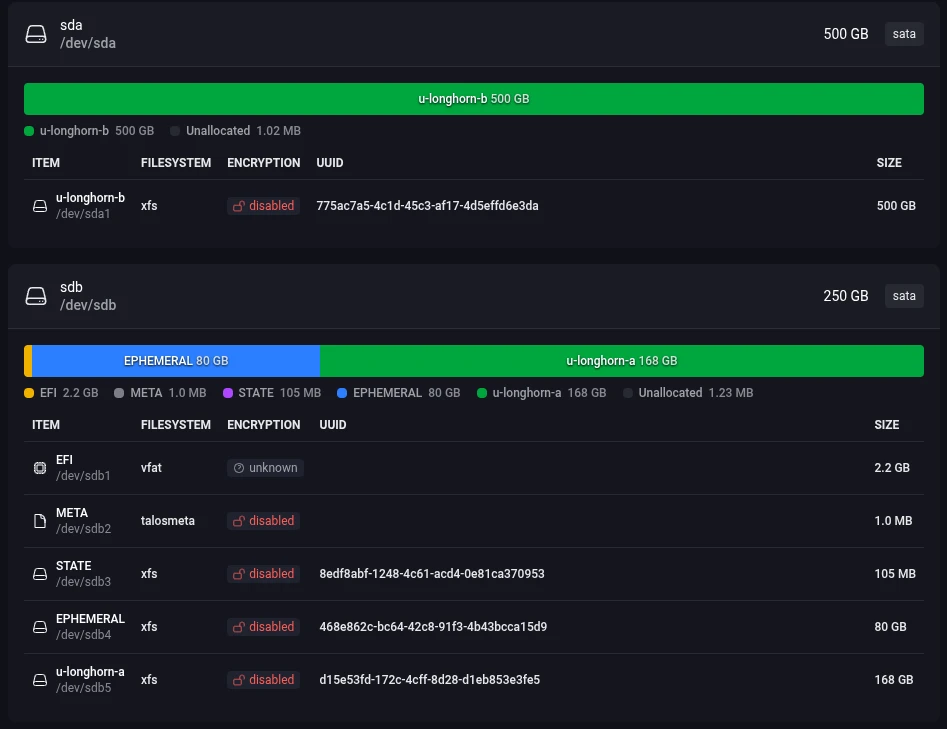
Finally got around to setting up storage on my Dell OptiPlex k8 cluster using Omni. I abandoned the idea of using Rook-Ceph, way to complicated for my needs (maybe skill issue). So back to Longhorn it is. I have set up Longhorn a couple of times so that setup went smooth. But I first needed to get the disks partitioned and setup via Talos OS. That took way to long to figure out. But now I know how to do it and I have a fully declarative config for it, so it was worth it. The full cluster config is just 50 lines! The new disk overview in Omni was a nice help (see img). So now that everything is setup I have 3 TiB of schedulable (sata) ssd storage, so 1 - 1,5 TiB with replication usable. Should be plenty, I only need 200 GB for my music.

Omni node disk view

#1770402595


[ homelab | k8s ]

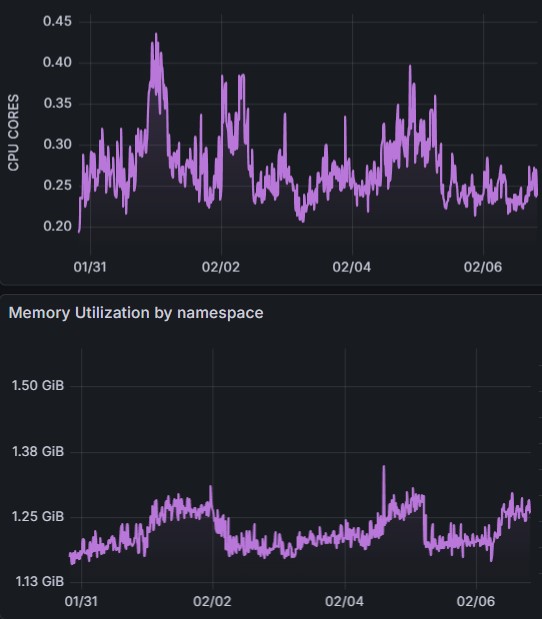
One of my Kubernetes nodes recently went down without me noticing (issue with VPS provider, not my fault). It was nice that all my services stayed online without any hiccups. But I would like to know in the future when my infra goes down. So time to get the classic stack online Grafana (now with build in Alertmanager), Node Expoter, CAdvisor, kube-state-metrics but no Prometheus this time. I am running VictoriaMetrics instead. It is a drop in replacement for Prometheus and is still written in Go but it is made to be more cost effective. It uses 7 times less memory, CPU and storage then Prometheus. And from my testing those numbers seem to be right. Currently I am storing 28.6 billion datapoints using just 4.37 GiB of storage. Below you can see the stats (for everything monitoring) with a current ingest rate at around 20K rec/s.

Resource consumption

#1769462323


[ homelab | k8s ]

I finally got S3-compatible buckets online, using a Hetzner storage box as the storage. I know they got S3 buckets as well but I am cheap and it will only be used for backups so I don’t care about speed.

For the setup I first used the Kubernetes SMB CSI driver to be able to use my storage box as regular PVC’s. On top of that I am running the Versity gateway. It is a completely stateless S3 server that can use a normal posix filesystem for the storage. It stores everything as plain files, so even without the gateway my files are still fully accessible. I could also spin up a gateway instance wherever I need one, even if my k8 cluster goes down. And I can run it in high availability on my cluster. All these things makes it perfect for backups. And it has nice web interface as a bonus. And of course it is written in Go.

apiVersion: v1
kind: PersistentVolumeClaim
metadata:
  name: versitygw-s3
  namespace: default
spec:
  accessModes:
    - ReadWriteOnce
  storageClassName: smb
  resources:
    requests:
      storage: 30Gi

#1765230859


[ homelab | k8s ]

MB is now officially running on a highly available Kubernetes cluster. Don’t know if uptime is going to be better because I don’t have a real load balancer. Currently it is just using DNS. So if one node goes down I will need to remove a DNS record and hope propagates fast enough. Still better then one node, at least I have still some control.

Non-authoritative answer:
Name:    mb.pine32.be
Address: 176.57.188.254
Name:    mb.pine32.be
Address: 185.211.6.112
Name:    mb.pine32.be
Address: 185.216.75.171

#1762808104


[ homelab | k8s ]

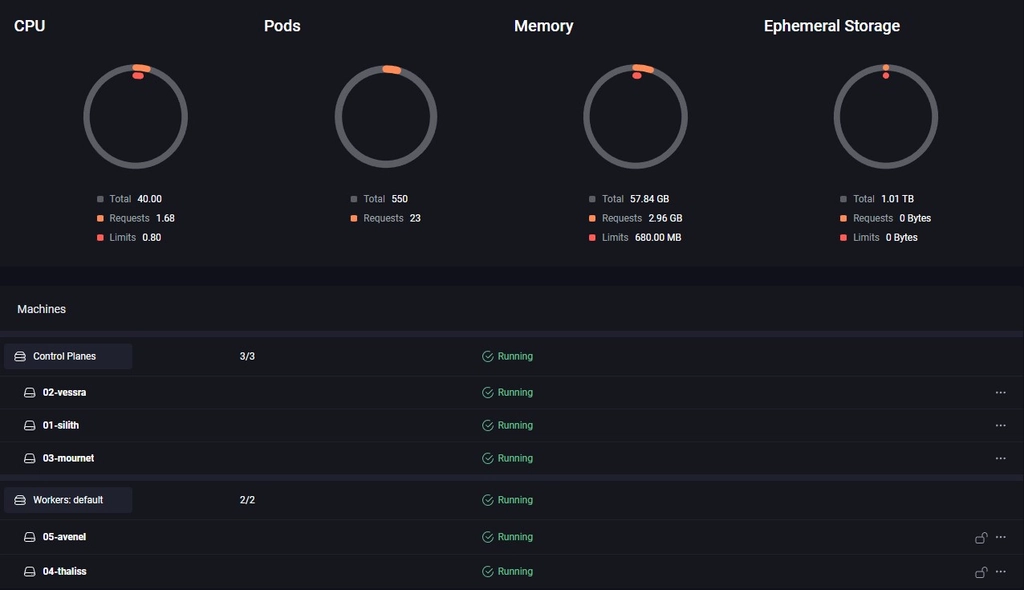
My first bare metal Kubernetes cluster is finally online. It took a while and I tried way to many different things but I eventually ended up with Talos and Omni for the management interface.

My first plan was some fancy net boot setup with IPXE and a custom http/tftp server that managed custom configs for each server. That will install K3s onto MicroOS and join the cluster without ever attaching a keyboard to the server. This was all done with Ignition and Combustion scripts. It worked but was error prone and instable. And later I discovered a very similar project already existed called Matchbox. This uses CoreOS instead of MicroOS, which is almost the same but Fedora flavoured. On top of this K3s is not that simple to setup, its lightweight but not simple. So I was reinventing a shitty wheel. But to my credit, it did work.

Something similar but with NixOS was my 3rd plan but never got to it but I don’t think it would have worked that much better. A bit cleaner but still clunky.

omni venom cluster dashboard view

So going back to Talos OS, which I underestimated at first. I thought it would be to frigid and require a lot of config. It does require some config but it is fully declarative so that was fine. But I was placentally surprised by the headless install via the http API. The install was also fast and as light as MicroOS + K3s. But still the CLI seemed error prone to me and bootstrapping everything was still a lot of manual work.

That is where Omni fills the gap. It was a pain to setup up with all the endpoints and certs that it requires (it also requires some form of SSO). But once that was done it was smooth sailing. You just create the installation media in the web interface and download the ISO (or even just copy over the PXE config in my case). And this setup is not specific for one node. You can use the same IMG on all the nodes and they will connect them self to the Omni server via a Wireguard tunnel waiting on you to make the full install via the UI. Once all nodes connected themselves to my Omni instance I just had to click ‘create cluster’. And once nodes are in the system I can reconfigure (clear, remove/add to a cluster, update…) as much as I want needing a new PXE boot or a fresh ISO. And it can handle many clusters and even automatically setup Wireguard networking in between nodes for a hybrid setup between the cloud and on-prem. It also has native support of Hetzner which ill will servantly test out. The only downside is that Omni is not free for production use. But for homelab it’s perfect (up to now).

Hardware is ‘done’ now, next step: lots of yaml’s.

#1760905046


[ homelab | k8s | hardware ]

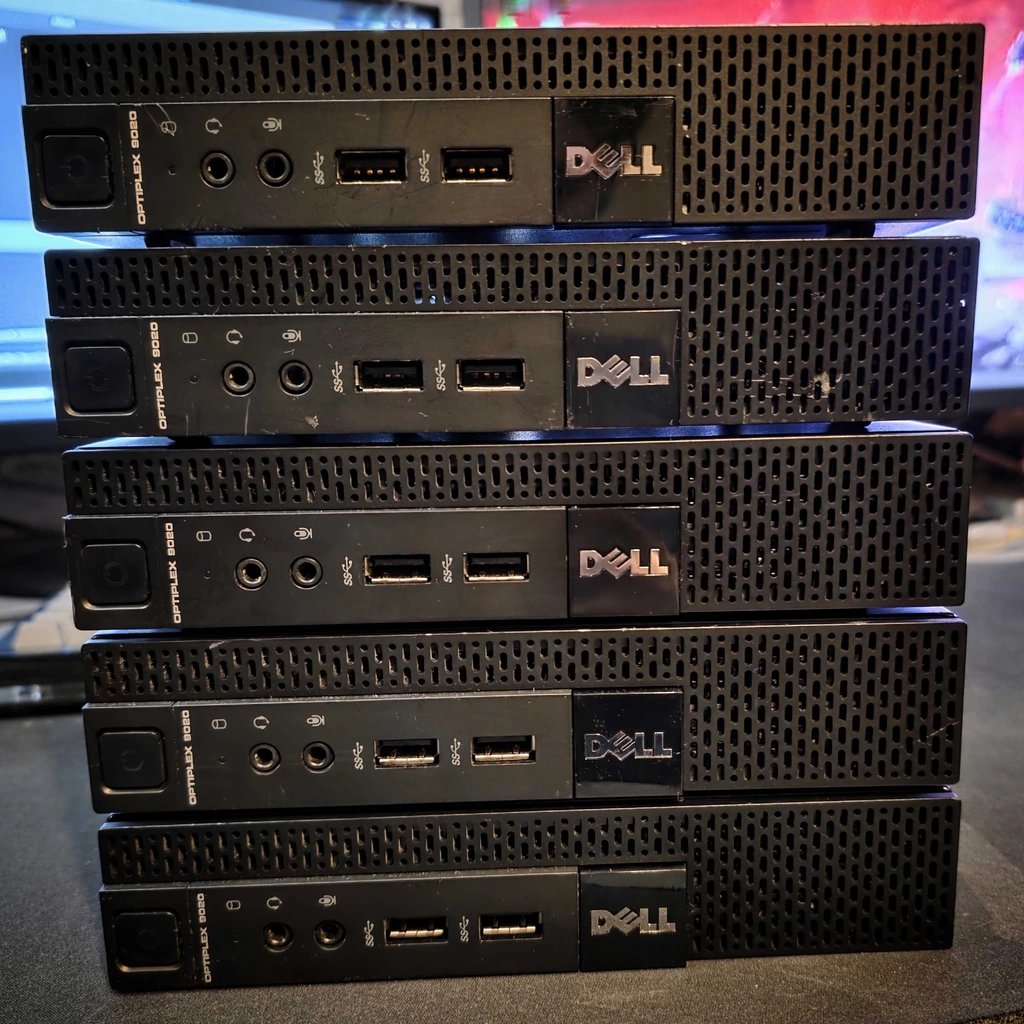
New bare metal Kubernetes cluster for my homelab. I got 5 cheap Dell OptiPlex micro pc’s second hand. i7-4785T, 12 GB DDR3 memory and 250GB SATA SSD each. Still setting everything up but it looks promising. More about the setup coming…

5 dell optiplex micro pc’s